So I got myself a Huawei Honor Pad 2 (JDN-AL00) some time ago (probably 2 years or so...) :
https://www.gsmarena.com/honor_pad_2-8390.php
Believe me, the the price under SGD$200 this pack a punch. The processor is fast and the graphics is fantastic. All was great. Google was in, by using Google Installer right from Huawei App Store. Then one day, shit happened. There was a Firmware upgrade Build JDN-AL00C233B023 that came along. There was no cancel option, just OK (Actually should have just shutdown or reboot...) but itchy fingers just did it anyway.
What happened? Google Play is a perpetual white screen. There was no error. Nothing. After days searching over the Internet, it was indeed confirmed that this firmware killed Google. The last working firmware was Build B018. Many smart people manage to downgrade it back and I had tried all options, download the OTA Full firmware. Reboot holding Vol + - and power... All in vain. Mainly because I made 2 critical mistakes.
1. Feeling too confident, I did not bothered to unlock the bootloader when I had the chance before Huawei shutdown the support to do so.
2. Without a unlocked bootloader, there was no way to get root. Thus, no way to TWRP, which enables firmware download so easily.
Guess I learned it the real hardway. I resorted to using APK install, APKPure marketplace etc. But life is not the same without the (official) Youtube and Chrome (Opera was decent, but... one kids make choices, adults wants all)
So a year had passed, I tried a few times, Google installer v2 v3, plug in power during flashing. The flashing always failed at some point. Read all the XDA post, downloaded all the firmware I could find. Nothing helped. NOTHING.
Until May 2020. The pad was in great condition and fantastic as ever, but without Google. This stupid trade war had damage users more than anybody else. Imagine, a perfect hardware and simply no real use for it because of its stupid software system (Yeah, I know its the same with Apple, but you asked for it when you bought that!).
So, a Russian friend pointed me to a forum. (Yes, not all Russian are hackers ok? Although I suspect he is one too...). The forum is PDA4u, which is.... famous for hacking.
https://4pda.ru/forum/index.php?showtopic=778914&st=40
My Russian sux so I had to use Google translate, but this time I did several things slightly differently.
1. System reset the tablet.
2. The Tablet was on full charge.
3. On the Pda4u thread, it seems to be a review, but go to page 6 on and you start to realized it is about hacking the device (typical Russian, not that I was to stereotype...).
4. But whats important there on Page 6 is the link https://yadi.sk/d/NeU_-gJ73HEdKc which points to the OTA Full firmware. With doubt it would work, I downloaded it AGAIN.
5. Extracted the Update.APP into DLOAD main folder on the SD card. All done on the phone itself.
6. I know normally, there is where you go and power down, Vol whatever + Power up to service mode... but This is the critical part that I think I did wrong in the pass (Not really wrong, but my fault for not rooting in the first place).
7. Somewhere on Page 13 (Yes, I dam read all those Russian until page 13...), there is a post about entering Engineering mode by dialing "* # * # 2846579 # * # *" and call.
8. This is somewhere I had not explored and inside Software Upgrade > SDCard Upgrade. Just run it and then I got error "PT Error" or something. Which I do not care, I assumed it doesn't work anyway. But what follows was it started to reboot. So I let it.
9. The tablet was in the Vol + Power screen updating (downgrading) the firmware as before. Which had failed zillions of time. So much so that this time I did not even bother to go plug it into the power (which I did in the past just to make sure). Guess what, carelessness pays off. The downgrade worked. Maybe the tablet finally sensed that I did not even care about it so much so that the firmware could kill it if it run out of power.
10. No Bootloader unlock. No Root. Just like that. After reboot, its B018 again. Everything is wiped again as usually and I installed back Google Play thru the old Google Framework Installer v2. After that there is a updates to Google as well, but it doesn't break anything anymore.
Now, if you bothered to read on in the forum, they talked about how to disable future updates. Which is also very important. I did not want another accident to happen. This part, I figured out on my own. I located the "Updater" App in the option menu. Then I basically disable all permission. No network, no disk storage. With this, even if it somehow knew there was a upgrade, it still cant write to disk so cannot download it. Also disable all the notification. But there is one notification left though.. its from System telling you that if you disable network/disk access, the system cannot update. This one happens once after a reboot. So who cares. Just remember never to say yes to that. I might actually try to fix that someday, but for now. This was the greatest downgrade ever for me.
I know I should reply in the forum track just for thanks and all, but I am not sure I can write in Russian was well as I would love to....
There are also 2 other points I need to point out here.
1. There is no such thing as a GLOBAL ROM for this model. If there was, Google would have been there and there was absolutely no problem at all in the first place. What many sellers posted about GLOBAL ROM is just having B018 with Google Play installed.
2. There are 2 versions of this tablet. The other one is W09. Please DO NOT cross flash the firmware. The W09 version is exactly the same but without LTE. It is the Wifi only version. Also, this version is a lot easier to downgrade, has its own instruction which I will not discuss here. There had been cases people tried to use the W09 firmware on the LTE and effectually broke their LTE by doing so.
Search This Blog
Showing posts with label Firmware. Show all posts
Thursday, May 14, 2020
Thursday, May 29, 2014
Diyomate K9 Firmware Update A20 14-5-8
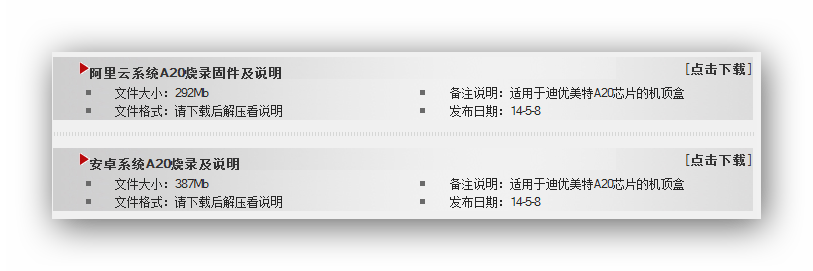
Well, it seems that a lot of people had been looking for the firmware to update your Diyomate K9 and it was nowhere to be found, even on Diyomate's website. Actually, to be honest, it IS on Diyomate's site here:
http://www.diyomate.com/DownLoadList.asp?CID=66
But it doesn't say K9 anywhere right? Yes, that is because the K9 box uses a chip call A20 (AllWinner) and Diyomate release the firmware according to the chipset rather than the Box model. Now you will see that there are 2 firmware release in May for A20.
So, what is the differences? Well in case you did not know,the K9 is one of the few model from Diyomate that ships with an option to have either Android or Ali YunOS. So theses 2 files corresponds to the 2 different options. And the good news is that in case you had chosen the wrong version, you just need to reflash it or if you want to change to the other favors, you too can just flash that in.
Ask me, personally, I prefer Ali YunOS and in fact, that is what you actually paid a little bit more for!
Have fun with your upgraded firmware! (Please copy all your important files to your SDCard first before flashing...)
Saturday, July 16, 2011
Playstation 3 CFW 3.55 KMEAW
Ever since Playstation decided to root out Linux, it got everyone pissed, which eventually lead to PS3 being jail broken. And today, I am going to tell you how to do it safely at home. I had tested many firmware and only recommend the most stable one here. Others varies.
Firstly, before you go ahead, check your system firmware. It has to be 3.55 or below. Currently, there is no publicly known way to downgrade from 3.56 onwards. Well, if you do have 3.41, you may want to consider sticking to it, but many games are coming out that soon require at least 3.5... So its only sooner or later you will be forced to do so.
I had chosen KMEAW's 3.55 CFW here. There is also a recently released call Varaques which enable you to reinstall your Linux back into the box. However, since it has 3.66 spoof installed, which in my opinion is not stable, I will not recommend it here. Of course, if PSN is a must for you, consider PS3ita's 3.55. They have a working spoof that enable the backdoor into PSN.
Right. So as before, I had packaged all the files into nice bundles for you. Just grab all the below files and I will explain as you are downloading...
3.55 OFW
http://www.fileserve.com/file/yAKcBbg
3.55 KMEAW CFW
http://www.fileserve.com/file/vgaMpu3
PS3 Utiltities
http://www.fileserve.com/file/M3cfATE
Steps:
Emulator
Firstly, before you go ahead, check your system firmware. It has to be 3.55 or below. Currently, there is no publicly known way to downgrade from 3.56 onwards. Well, if you do have 3.41, you may want to consider sticking to it, but many games are coming out that soon require at least 3.5... So its only sooner or later you will be forced to do so.
I had chosen KMEAW's 3.55 CFW here. There is also a recently released call Varaques which enable you to reinstall your Linux back into the box. However, since it has 3.66 spoof installed, which in my opinion is not stable, I will not recommend it here. Of course, if PSN is a must for you, consider PS3ita's 3.55. They have a working spoof that enable the backdoor into PSN.
Right. So as before, I had packaged all the files into nice bundles for you. Just grab all the below files and I will explain as you are downloading...
3.55 OFW
http://www.fileserve.com/file/yAKcBbg
3.55 KMEAW CFW
http://www.fileserve.com/file/vgaMpu3
PS3 Utiltities
http://www.fileserve.com/file/M3cfATE
Steps:
- 3.55 OFW is the original firmware. The most stable way to upgrade is to go into the original firmware first.Just pack it into you thumbdrive root. The directories are prepared for you.
- OK, after flashign in 3.55 OFW, you will need to boot your PS3 into debug mode. To do so, shutdown your PS3 first. Hold on to your power button. And I mean it hold on. You should hear "beep" then another "beep" and it shut down.
- Continue to hold on, do not let go. PS3 will boot up and then it will "beep" then "beep beep". At "beep beep", release the button. Don't worry, if you missed it, it will just "beep" one more time and shutdown. You need to repeat step 3.
- You will be prompt to connect your controller and press the Playstation button on the controller.
- You should see a very different menu which has about 8 options, the last one is to flash the update. Make sure you have your 3.55 KMEAW CFW onto another thumbdrive (or same, but it should overwrite your OFW. I just think its not so complicated to use 2 thumbdrives). Plug the thumdrive in and choose the option to update firmware. This will take another round which is similar to the OFW update.
- After reboot, you should be in 3.55 CFW. Now its time to roll in some ultilities.
PS3 Utilities Pack
First of all, I had chosen the basic stuff that you will need. There are many many others out there, you may want to explore and find then yourself. Unpack the files into the root of your thumbdrive and insert it into your PS3. Go to Games, install package and select them accordingly.
- multiMAN ver 02.02.00 (20110709-200500).pkg - MultiMan v2.02 for managing/launching your games
- BDEMU-355.pkg - BD-ROM Emulator
- LAST_GAME_355 - Mounts the last game you launched from multiMAN and returns you to XMB. Start the game from disc icon or /app_home
- BDROM-RESET - Removes path redirections, removes bd-mirror (restores usb to normal mode) and moves the last game played in bd-mirror mode back to its location.
- openps3ftp.pkg - Open PS3 FTP for transfering your files into your PS3 directly. This is very useful for large files which will not fit onto your portable FAT32 HDD.
- ComgenieAwesomeFilemanager355.pkg - A good file manager for the PS3
Emulator
I thought, why not? I include a emulator call FBAnext r486 here.
fba-mm-ps3.pkg - Supports Capcom CPS-1 / Capcom CPS-2 / Capcom CPS-3 Cave / Neo Geo / Sega System 16 / Toaplan / Taito / Psikyo 68EC020 Plus Other Misc Great Arcade Systems
Grab it here:
http://www.fileserve.com/file/WnM3eqe
Grab it here:
http://www.fileserve.com/file/WnM3eqe
Sunday, June 12, 2011
PSP Firmware 6.39-ME5
I decided to jump up to the version 6 firmware finally after hanging around 5.50-pro for a while. I had found that for v6, there are 2 main camp now. ME by Nuer0n and Pro by TEAM PRO. I had decided to go with ME since there are clearer instructions and such, where TEAM PRO does not comes with documentation and a lot of the steps are open for misinterpretation, which is dangerous.
In any case, if you have been with me for firmware, you know how I work. I have prep the firmware for Slim (or Phat since there is no difference for this firmware) and make sure you have a 8B and below date code. If you had been using 5.50 (if you had followed my blog) then you are pretty safe to go up to 6.39 with me now.
Here is the file:
http://www.fileserve.com/file/kjJresj
Just download it and unpack it to \PSP\GAME and you are good to go. Find the Update on your XMB and run it. It will check the files and run the official update, then reboot with the patch.
Go try out some games! Oh wait, I almost had an heart attack when I did. None of the games work!!! All of them give some error about The Game Cannot be Started 800100XX. Actually I had seen this error before. I think its Shadow of Destiny... In any case, DO NOT WORRY. You did not brick your PSP. The firmware works. Just check at System if you do not believe me.
What is wrong is the UMD driver. You need to press [Select] and change it from "Normal" to M33 or SONY XXXX. Then try the games again. Yes, it works. I can see the smile on your face.
In any case, if you have been with me for firmware, you know how I work. I have prep the firmware for Slim (or Phat since there is no difference for this firmware) and make sure you have a 8B and below date code. If you had been using 5.50 (if you had followed my blog) then you are pretty safe to go up to 6.39 with me now.
Here is the file:
http://www.fileserve.com/file/kjJresj
Just download it and unpack it to \PSP\GAME and you are good to go. Find the Update on your XMB and run it. It will check the files and run the official update, then reboot with the patch.
Go try out some games! Oh wait, I almost had an heart attack when I did. None of the games work!!! All of them give some error about The Game Cannot be Started 800100XX. Actually I had seen this error before. I think its Shadow of Destiny... In any case, DO NOT WORRY. You did not brick your PSP. The firmware works. Just check at System if you do not believe me.
What is wrong is the UMD driver. You need to press [Select] and change it from "Normal" to M33 or SONY XXXX. Then try the games again. Yes, it works. I can see the smile on your face.
Thursday, April 07, 2011
Restore Milestone XY720 to Stock Firmware ROM
Sometimes, for whatever reason, you will find that you need to restore the phone to its original state. For Milestone XT720, its quite straight forward if you manage to find all the tools.
Firstly, you will need the flasher tool from Motorola. It is called RSD Lite. There is a version 4.9 from this link:
http://www.fileserve.com/file/srXxEhg
Simply install this and you will have the flasher tool and drivers ready.
You will need to hunt for the right ROM to flash to. I had seen some of these ROM around, but the hardest to find is perhaps the Singapore one, which there is a mirror here:
http://www.fileserve.com/file/WJMwZEa
Firstly, you will need the flasher tool from Motorola. It is called RSD Lite. There is a version 4.9 from this link:
http://www.fileserve.com/file/srXxEhg
Simply install this and you will have the flasher tool and drivers ready.
You will need to hunt for the right ROM to flash to. I had seen some of these ROM around, but the hardest to find is perhaps the Singapore one, which there is a mirror here:
http://www.fileserve.com/file/WJMwZEa
- Load the RSD Lite and extract the *.sbf from the ROM.
- Shut down your phone and take out battery.
- Hold Power + Camera + Volume Down and place the battery in. You should get a DOs lookalike prompt now. This is the service mode.
- Plug phone into PC using USB Cable.
- Load the *.sbf file in RSDLite. Check information to see it is indeed the right ROM for you.
- Wait until the phone is detected, highlight it and click [Start].
- There are many steps, but one of them involving checksum may take a while.
- When it tells you to manually power off, unplug the phone.
- Shut down RSD Lite.
- You should now have the original Stock ROM.
Hope the above helps.
Sunday, November 14, 2010
PSP 5.50 Prometheus 3 v2
This had been released for a while and I had tested it with a PSP Slim. With no new firmware, sticking to 5.50 will means you cannot play many games which requires 6.x firmware. This is where the Prometheus patch comes in. It enable the 5.50 Firmware to run 6.x required games.
Prometheus 3 v2 fixes some bug with the XMB return. Just copy my archive to the root of your PSP memory stick and execute the patch from XMB. You most likely needs a reboot.
Grab it from:
http://www.fileserve.com/file/8EPmXeh
Prometheus 3 v2 fixes some bug with the XMB return. Just copy my archive to the root of your PSP memory stick and execute the patch from XMB. You most likely needs a reboot.
Grab it from:
http://www.fileserve.com/file/8EPmXeh
Sunday, October 17, 2010
Custom Firmware 5.50 Prometheus-2 for PSP-2000 and PSP-1000
If you had been following my PSP update, it is finally time to put in a new firmware to support those games that requires 6.30+ firmware. In any case, you will need to have 5.50 Gen-D3 in order to upgrade to this firmware.
You scan grab 5.50 Gen-D3 from here:
http://nemesisv.blogspot.com/2010/01/psp-firmware-550-gen-d3-final.html
Grab 5.50 Prometheus 2 upgrade here:
http://www.mediafire.com/?f4oy2dn4vq4vc
You scan grab 5.50 Gen-D3 from here:
http://nemesisv.blogspot.com/2010/01/psp-firmware-550-gen-d3-final.html
Grab 5.50 Prometheus 2 upgrade here:
http://www.mediafire.com/?f4oy2dn4vq4vc
Tuesday, June 29, 2010
D-Link from Starhub will NEVER fix the HNAP vulnerability?
Earlier this year in Jan, SourceSec Security Research published a exploit which in fact is just a SOAP packet which allow users to set admin passwords (in the LAN, unless someone finds a way to use HNAP over WAN) on some of the routers. I have reasons to believe in fact it is all routers supporting HNAP.
The details:
http://www.sourcesec.com/tag/hnap/
D-Link replied and stated somethings which I think was stupid such as it can only be exploited with the software (which I see is nothing more than injecting a SOAP packet because there is no authentication). I believe anyone with some SOAP knowledge is able to just send the packet over or simply run the bash scripts available on the website.
The argument about which firmware is probably some overlook by the security researcher, but D-Link should spend more time checking which are the affected firmware instead of check out which of the listed firmware did not exist!
BUT, this is the best part. Singapore telco Starhub has some promotion for their users to get D-Link products (for free I guess) and D-Link has even created a special page for Starhub users.
Here is the "Download" page for the Starhub equipment on D-Link:
http://www.dlink.com.sg/Starhub/downloads.asp
The best part is, look at those firmware. They are ancient! The link still works though, but it seems like this page is totally forgotten and they will probably not update it any further. What this means is that all Starhub users who follows this link will believe that this is the latest firmware available for their routers. And take for example DIR-655. The vulnerability is only fixed in 1.33NA which has the following update notes:
¤ Fixed: Correct HNAP issue.
¤ Fixed: DNS relay issue ( WAN Slowdown )
¤ Added: Advanced DNS descriptions
And we still have 1.11 on the Starhub page. To add some damage to this, 1.33NA is essentially for North America. I had tried looking for 1.33WW (world Wide) and this only thing that came close is from the Russia FTP which may very well end up giving you a Russian web interface (unconfirmed).
Has D-Link forsaken the rest of the world on DIR-655? Well share your thoughts here in the comments.
The details:
http://www.sourcesec.com/tag/hnap/
D-Link replied and stated somethings which I think was stupid such as it can only be exploited with the software (which I see is nothing more than injecting a SOAP packet because there is no authentication). I believe anyone with some SOAP knowledge is able to just send the packet over or simply run the bash scripts available on the website.
The argument about which firmware is probably some overlook by the security researcher, but D-Link should spend more time checking which are the affected firmware instead of check out which of the listed firmware did not exist!
BUT, this is the best part. Singapore telco Starhub has some promotion for their users to get D-Link products (for free I guess) and D-Link has even created a special page for Starhub users.
Here is the "Download" page for the Starhub equipment on D-Link:
http://www.dlink.com.sg/Starhub/downloads.asp
The best part is, look at those firmware. They are ancient! The link still works though, but it seems like this page is totally forgotten and they will probably not update it any further. What this means is that all Starhub users who follows this link will believe that this is the latest firmware available for their routers. And take for example DIR-655. The vulnerability is only fixed in 1.33NA which has the following update notes:
¤ Fixed: Correct HNAP issue.
¤ Fixed: DNS relay issue ( WAN Slowdown )
¤ Added: Advanced DNS descriptions
And we still have 1.11 on the Starhub page. To add some damage to this, 1.33NA is essentially for North America. I had tried looking for 1.33WW (world Wide) and this only thing that came close is from the Russia FTP which may very well end up giving you a Russian web interface (unconfirmed).
Has D-Link forsaken the rest of the world on DIR-655? Well share your thoughts here in the comments.
Tuesday, April 20, 2010
New HTC Maple 3VO ROM V3VO.3.00.041010

A new version of the Maple 3VO ROM is out. The version is now 3VO.3.00.041010!
Grab it via:
http://forum.xda-developers.com/showthread.php?t=551642
Thursday, April 08, 2010
PS3 V3.2.1 Custom Firmware makes Linux possible again
I guess its no surprise that a custom firmware hack gives hope to installation of Linux on the PS3 again. All we need is a custom firmware to run ISO... Just like on the PSP...
Monday, April 05, 2010
Modding the HTC Snap into HTC Maple 3VO ROM

From the last post regarding the installation of the Hard SPL on the HTC Snap:
http://nemesisv.blogspot.com/2010/04/flashing-htc-snap-s52x-maple.html
I guess everyone saw this one coming. The whole point of modification of the SPL is to enable you to flash custom ROM. However, before we even go about talking about the ROM, there is one more piece of software which some people recommend to install. This is the SDA Application Unlock. What this piece of software do it it enable you to install unsigned applications smoothly. However, there is also a security risk that it can allow bad applications like dialers etc install on your phone. So, its entirely optional and you better know what you are doing. The link for this application and the ROM are both listed here:
http://forum.xda-developers.com/showthread.php?t=551642
Follow my previous instruction to install Hard SPL v1.1.9 and/or SDA-ApplcationUnlock. Do a backup as well since its likely you want to restore all your contacts etc. Then:
1.Remove the battery and the SD Card--> Put ONLY the battery back in.
2.The flash will take about 5 minutes (Although it says 15, mine took last then 2 minutes only)
3.If your device is already HardSPL, simply run RomUpdateUtility.exe and follow the prompts
4.Upon first boot, it will seem frozen for a few minutes, maybe even go black. This is NORMAL! (After which you can sync your new ROM wiht your PC)
For me, I use SPB Backup 2 and all I needed to do was to restore all my information in ROM Update mode and its all done. Well in case shit does happen:
1.Remove the battery and the SD Card--> Put ONLY the battery back in.
2.While holding the volume down button, press the power button
3.The multicolor bootloader screen will come up
4.Plug in the USB cable and flash back your original shipped ROM
5.Find out what went wrong and reflash this ROM properly
http://nemesisv.blogspot.com/2010/04/flashing-htc-snap-s52x-maple.html
I guess everyone saw this one coming. The whole point of modification of the SPL is to enable you to flash custom ROM. However, before we even go about talking about the ROM, there is one more piece of software which some people recommend to install. This is the SDA Application Unlock. What this piece of software do it it enable you to install unsigned applications smoothly. However, there is also a security risk that it can allow bad applications like dialers etc install on your phone. So, its entirely optional and you better know what you are doing. The link for this application and the ROM are both listed here:
http://forum.xda-developers.com/showthread.php?t=551642
Follow my previous instruction to install Hard SPL v1.1.9 and/or SDA-ApplcationUnlock. Do a backup as well since its likely you want to restore all your contacts etc. Then:
1.Remove the battery and the SD Card--> Put ONLY the battery back in.
2.The flash will take about 5 minutes (Although it says 15, mine took last then 2 minutes only)
3.If your device is already HardSPL, simply run RomUpdateUtility.exe and follow the prompts
4.Upon first boot, it will seem frozen for a few minutes, maybe even go black. This is NORMAL! (After which you can sync your new ROM wiht your PC)
For me, I use SPB Backup 2 and all I needed to do was to restore all my information in ROM Update mode and its all done. Well in case shit does happen:
1.Remove the battery and the SD Card--> Put ONLY the battery back in.
2.While holding the volume down button, press the power button
3.The multicolor bootloader screen will come up
4.Plug in the USB cable and flash back your original shipped ROM
5.Find out what went wrong and reflash this ROM properly
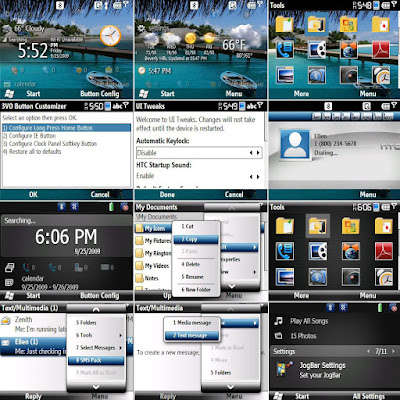
Here are some screenshot of what Maple 3VO looks like:

To me, there are some improvements like Opera is out (waste space) and auto locking etc... Try it out and let me know what you think.
Saturday, April 03, 2010
Flashing the HTC Snap S52X Maple
Before the HTC Maple class can be flashed to a custom firmware, the Hard SPL need to be installed. However you can check the SPL version by holding [Volume Down] and doing a cold boot. Mine says 1.24. But I found a way to flash the Hard SPL down to 1.19.
Below are the original instructions:
1. Removed SIM and SD card
2. Connected, established a sync connection w/ActiveSync
3. In JockyW's folder; open "SSPL"
4. Run SSPL.bat
5. If you have a firewall or anti-rootkit running ie. COMODO Internet Security, disable those and the sandbox if your security software has one. I left Bullguard on.
6. Follow commands in command prompt
7. Pop up should show on your device's screen. You may need to dismiss those messages about no SIM cards etc first.
8. The "OK" option is outside of the screen's viewable area, press the trackball or press enter.
9. The phone's screen will shut off but the keyboard will remain lit
10. DO NOT DISCONNECT (Yes, I know there is nothing on the screen)
11. LEAVE ACTIVESYNC ALONE
12. Return to the JockyW folder
13. Run the ROMUpdateUtility
14. It will complete HOWEVER when you start your device, it will stay at the T-Mobile splash screen, but that's okay, given that your device should now be hardSPL'd and you are ready to get a new ROM to install and enjoy, because we know just how much the OEM ROM sucked. For me, the T-Mobile did not turn up.
You need to download the Hard SPL from xda-developer via:
http://forum.xda-developers.com/showthread.php?t=550620
Below are the original instructions:
1. Removed SIM and SD card
2. Connected, established a sync connection w/ActiveSync
3. In JockyW's folder; open "SSPL"
4. Run SSPL.bat
5. If you have a firewall or anti-rootkit running ie. COMODO Internet Security, disable those and the sandbox if your security software has one. I left Bullguard on.
6. Follow commands in command prompt
7. Pop up should show on your device's screen. You may need to dismiss those messages about no SIM cards etc first.
8. The "OK" option is outside of the screen's viewable area, press the trackball or press enter.
9. The phone's screen will shut off but the keyboard will remain lit
10. DO NOT DISCONNECT (Yes, I know there is nothing on the screen)
11. LEAVE ACTIVESYNC ALONE
12. Return to the JockyW folder
13. Run the ROMUpdateUtility
14. It will complete HOWEVER when you start your device, it will stay at the T-Mobile splash screen, but that's okay, given that your device should now be hardSPL'd and you are ready to get a new ROM to install and enjoy, because we know just how much the OEM ROM sucked. For me, the T-Mobile did not turn up.
You need to download the Hard SPL from xda-developer via:
http://forum.xda-developers.com/showthread.php?t=550620
Saturday, January 23, 2010
PSP Firmware 5.50 GEN-D3 Final
Recently I just realized that the firmware scene is a big mess since DA left us. I had been faithfully on 5.00 M33-6, but somehow the newer games just wont run anymore at this firmware. The Latest OFW I know is 6.20 now, which I am not too keen to upgrade too.
After some reading and testing, I found the most stable custom firmware for now would be the GEN 5.50. So again, I always provide you the link and instructions if you had been faithfully following my posts.
Here is the changelog:
5.03GEN-D3 Installer/XGEn Pandora By Yoshihiro and Team Gen.
What's up doc ?
* Compatibility with all known PSN Game/Démo from on 15/12/2009
* Compatibility with all known UMD on 15/12/2009
* Add ISO SPeed MS loading (Bêta version non really tested because we don't have any fake MS)
* Network update
Tested games :
* Tekken 6
* Gundam vs Gundam
* Phantasy Star Portable 2
* Naruto
* J-League Pro Soccer Club o Tsukurou 6 Pride of J
* Naruto Shippuden Narutimate Accel 3
* James Cameron Avatar The Game
* Phantasy Star Portable 2
* R-Type Tactics II Operation Bitter Chocolate
* Bleach Soul Carnival 2
* Battle Spirits Kiseki no Hasha
* Yamada
* etc.
Added by NemesisV:
* Metal Slug XX
* Disgaea 2
* Queen's Blade
Doesn't work:
* Soulcalibur 4 (I wonder if I did something wrong on this on...)
Donation :
If you want to support DEVS of Team GEN you can make a donation via paypal :
https://www.paypal.com/cgi-bin/webscr?cmd=_s-xclick&hosted_button_id=10174201
Tips :
to bypass the battery check please connect your AC cord.
Greetings from Team GEN :
* Yoshihiro for all his hard work
* HelldashX (Miriam) for his hard work on GEN CFW
* GENyUS and Eugene for their hard work on CFW GEn
* Total_Noob for network update
* SatilOs (icon0 and pic1)
* Nem, Booster, Kavula and all people who made all this new stuff possible
* Fanjita for all his great work on PSP scene.
* Dark_Alex for all his work on CFW
* MathieuLH for all his work on CFW and more
* Gamefreax.com (for the invizimal's Go!Cam)
* all people who send us positive messages to continue.
Yoshihiro PSP XGEN UPDATER FOR PSPGEN CFW 5.50GEN D3
use it at your own risk :).
For the latest GEN CFW release visit http://www.pspgen.com
Team GEN
There is some optional task you may want to do first before you upgrade.
Download:
http://www.mediafire.com/?3i4yyiq4zkx
Extract it to the root of your PSP Memory Stick. Make sure its ALL. The 550 file in the root is VERY important.
Boot your PSP and run the updater. The rest is just following instructions.
Make sure you reboot at the end of the upgrade.
After some reading and testing, I found the most stable custom firmware for now would be the GEN 5.50. So again, I always provide you the link and instructions if you had been faithfully following my posts.
Here is the changelog:
5.03GEN-D3 Installer/XGEn Pandora By Yoshihiro and Team Gen.
What's up doc ?
* Compatibility with all known PSN Game/Démo from on 15/12/2009
* Compatibility with all known UMD on 15/12/2009
* Add ISO SPeed MS loading (Bêta version non really tested because we don't have any fake MS)
* Network update
Tested games :
* Tekken 6
* Gundam vs Gundam
* Phantasy Star Portable 2
* Naruto
* J-League Pro Soccer Club o Tsukurou 6 Pride of J
* Naruto Shippuden Narutimate Accel 3
* James Cameron Avatar The Game
* Phantasy Star Portable 2
* R-Type Tactics II Operation Bitter Chocolate
* Bleach Soul Carnival 2
* Battle Spirits Kiseki no Hasha
* Yamada
* etc.
Added by NemesisV:
* Metal Slug XX
* Disgaea 2
* Queen's Blade
Doesn't work:
* Soulcalibur 4 (I wonder if I did something wrong on this on...)
Donation :
If you want to support DEVS of Team GEN you can make a donation via paypal :
https://www.paypal.com/cgi-bin/webscr?cmd=_s-xclick&hosted_button_id=10174201
Tips :
to bypass the battery check please connect your AC cord.
Greetings from Team GEN :
* Yoshihiro for all his hard work
* HelldashX (Miriam) for his hard work on GEN CFW
* GENyUS and Eugene for their hard work on CFW GEn
* Total_Noob for network update
* SatilOs (icon0 and pic1)
* Nem, Booster, Kavula and all people who made all this new stuff possible
* Fanjita for all his great work on PSP scene.
* Dark_Alex for all his work on CFW
* MathieuLH for all his work on CFW and more
* Gamefreax.com (for the invizimal's Go!Cam)
* all people who send us positive messages to continue.
Yoshihiro PSP XGEN UPDATER FOR PSPGEN CFW 5.50GEN D3
use it at your own risk :).
For the latest GEN CFW release visit http://www.pspgen.com
Team GEN
There is some optional task you may want to do first before you upgrade.
- Backup your whole PSP Memstick (Games and Savegame being hte MOST important)
- Disable all the plugins. Hold R and boot up. (I have CWCheat mainly, but I did not disable. It works for me.)
- Charge your battery to >78% or plug in the power cord. (Ya, I know the USB charge also works, but highly not advisible)
Download:
http://www.mediafire.com/?3i4yyiq4zkx
Extract it to the root of your PSP Memory Stick. Make sure its ALL. The 550 file in the root is VERY important.
Boot your PSP and run the updater. The rest is just following instructions.
Make sure you reboot at the end of the upgrade.
Friday, October 16, 2009
Upgrading of Mobile Broadband Huawei E220
I was using this (crappy) mobile broadband t-loaned from the company. The software was incredible frustrating. Well, at least it is on the laptop which has Pointsec Protector. The CD-ROM keep getting block and even after many attempts to install the software, in the end it sometimes cannot detect the modem.
So, I was looking around and found this:
http://m1.com.sg/M1/site/M1Corp/menuitem.e2f30a2a1a1860b609b422103f2000a0/?vgnextoid=6e2a7cfeda9ba110VgnVCM100000695a230aRCRD&vgnextfmt=pdate:0910161234:
Yes, there is a firmware upgrade to Firmware Version 11.117.10.02.00.B268) as well as the software upgrade (which need to be flashed onto the firmware first) for VMC Lite (Version VMC 3.2.1.156).
After the installation, things went a bit more smoothly. If you have similar issues, you can give it a shot. BTW, this firmware supports Vodaphone and other providers as well.
So, I was looking around and found this:
http://m1.com.sg/M1/site/M1Corp/menuitem.e2f30a2a1a1860b609b422103f2000a0/?vgnextoid=6e2a7cfeda9ba110VgnVCM100000695a230aRCRD&vgnextfmt=pdate:0910161234:
Yes, there is a firmware upgrade to Firmware Version 11.117.10.02.00.B268) as well as the software upgrade (which need to be flashed onto the firmware first) for VMC Lite (Version VMC 3.2.1.156).
After the installation, things went a bit more smoothly. If you have similar issues, you can give it a shot. BTW, this firmware supports Vodaphone and other providers as well.
Monday, June 08, 2009
R4 for NDS using YSMenu Update June 2009
Its becoming inevitable. Many of the newer ROMs on the NDS using R4 (Not R4HD) is giving errors about not able to create save files and quitting. Trying to update it to version 1.18 does help for some, but not all. The solution is to use another firmware. The one I will talk about here is YSMenu.
Now, the trciky part about YSMenu is that the author does not allow premade firmware to be posted online. But I will show you that Maikel's Automater (R4YSAuto) will make it simple.
First you will have to download that from:
http://gbatemp.net/index.php?showtopic=103879
But you know my style. I always prefer to have everything done for you. So, don't worry about the download first. But for YSMenu, you have no choice. Since I cannot host it, you will have to download from:
http://home.usay.jp/pc/etc/nds/
Its in Japanese, but here is how to do it, use search. Find YSMenu. First link is the summary at the top, next link is the right one. you should be getting "YSMenu0903211700.zip".
Now, grab my prepacked R4YSauto here:
http://www.mediafire.com/?axnniyjnzdx
The main difference is that I had made the R4YSauto works with the latest YSMenu "YSMenu0903211700.zip" while the original requires you to rename it. Well, it will be the same if you use a newer one anyway. In addition, I had also included the latest usrcheat.dat as of 2 June 09.
Now, all you need to do it to unpack the R4YSauto to a directory. Then throw the "YSMenu0903211700.zip" into the same directory and run r4.bat. Answer the question accordingly, basically "R4" and "Firmware" are hte important choices. The rest can varies.
Then you will have you firmware. Unpack it into your MicroSD and its done.
Now, the trciky part about YSMenu is that the author does not allow premade firmware to be posted online. But I will show you that Maikel's Automater (R4YSAuto) will make it simple.
First you will have to download that from:
http://gbatemp.net/index.php?showtopic=103879
But you know my style. I always prefer to have everything done for you. So, don't worry about the download first. But for YSMenu, you have no choice. Since I cannot host it, you will have to download from:
http://home.usay.jp/pc/etc/nds/
Its in Japanese, but here is how to do it, use search. Find YSMenu. First link is the summary at the top, next link is the right one. you should be getting "YSMenu0903211700.zip".
Now, grab my prepacked R4YSauto here:
http://www.mediafire.com/?axnniyjnzdx
The main difference is that I had made the R4YSauto works with the latest YSMenu "YSMenu0903211700.zip" while the original requires you to rename it. Well, it will be the same if you use a newer one anyway. In addition, I had also included the latest usrcheat.dat as of 2 June 09.
Now, all you need to do it to unpack the R4YSauto to a directory. Then throw the "YSMenu0903211700.zip" into the same directory and run r4.bat. Answer the question accordingly, basically "R4" and "Firmware" are hte important choices. The rest can varies.
Then you will have you firmware. Unpack it into your MicroSD and its done.
Sunday, April 05, 2009
PSP Firmware 5.00 M33-6
I had not updated a while on PSP firmware. It seems that 5.00 M33-6 is out. The main bug fixes are as follows:
Changes in 5.00 M33-5:
- A setting has been added to recovery, that, when enabled it may increase memory stick reading speed. (only on the psp, not in the pc).
By default it is disabled. If you installed 3.71 fatmsmod, do not use this setting, as its perfomance with 3.71 driver has not been tested.
Instead, reinstall 5.00 m33-4 using dc8 and update to 5.00 m33-5
Changes in 5.00 M33-6:
- Fixed a bug that made unbootable psp without memory stick or with a bad one.
So, basically, up yours to 5.00 M33 at least. Then apply this patch to upgrade it to 5.00 M33-6.
Monday, November 17, 2008
D-link DIR-655 Firmware 1.21 with USB support
Read all about it and also about the Secureport managed services which is slammed on several places including Slashdot :
http://tech.slashdot.org/article.pl?sid=08/11/05/2220213&from=rss
The changes are as stated on their support page:
http://support.dlink.com/products/view.asp?productid=DIR%2D655
Anyway, what they did not tell you is that there is a official firmware 1.21 which does not contain the Secureport function and you can download it at:
ftp://ftp.dlink.com/Gateway/dir655/Firmware/dir655_firmware_121_no_securespot.zip
http://tech.slashdot.org/article.pl?sid=08/11/05/2220213&from=rss
The changes are as stated on their support page:
http://support.dlink.com/products/view.asp?productid=DIR%2D655
Anyway, what they did not tell you is that there is a official firmware 1.21 which does not contain the Secureport function and you can download it at:
ftp://ftp.dlink.com/Gateway/dir655/Firmware/dir655_firmware_121_no_securespot.zip
Monday, November 03, 2008
YSMenu Oct 2008
In case you are wondering what is this. We all know that R4 for NDS has stop developement for quite a while stuck at V1.18. Even the NDS code manager recently has been giving me problem updating the cheat list. There is a R4 SDHC and I am very sure just using the firmware is not going to make your R4 into a R4 SDHC. So, here is one of the shell I tried.
YSMenu is basically japanese and to make the firmware and files for the NDS requires a hell lot of steps. You can read all about it at :
http://www.gbatemp.net/index.php?showtopic=97615
but I had save you some time by prepaing it and patching it with the DSTT firmware from :
http://www.gbatemp.net/index.php?showtopic=71613
And to make it all right, I added the cheat list as of 28 Oct 2008. In addition, I even throw in the GBA/GBC Emulator into the package.
So, with all these works put in, tell me why you will not download this for a shot on your NDS R4?
Grab it at:
YSMenu Oct 2008
YSMenu is basically japanese and to make the firmware and files for the NDS requires a hell lot of steps. You can read all about it at :
http://www.gbatemp.net/index.php?showtopic=97615
but I had save you some time by prepaing it and patching it with the DSTT firmware from :
http://www.gbatemp.net/index.php?showtopic=71613
And to make it all right, I added the cheat list as of 28 Oct 2008. In addition, I even throw in the GBA/GBC Emulator into the package.
So, with all these works put in, tell me why you will not download this for a shot on your NDS R4?
Grab it at:
YSMenu Oct 2008
PSP Slim 5.00 M33-3
Yes, its time to do the 5.00 M33-3 update now. Its plain simple. Just unpack it to the root of your memory stick and patch and reboot. Tada, its now 5.00 M33-3.
BTW, you need 5.00 M33 in hte first place to perform this update.
Download 5.00 M33-3 here:
PSP 5.00 M33-3
BTW, you need 5.00 M33 in hte first place to perform this update.
Download 5.00 M33-3 here:
PSP 5.00 M33-3
PSP 5.00 M33 0xFFFFFFFF PSX Error Fix v2
This is the trickiest of the installation for 5.00 M33. Ok, make sure you are not connected using the USB connection menu. Exit that menu if you are. I have to presumed you had flashed 5.00 M33, because this file is patched on top of that firmware. What you need to do now is :
1. Press and hold [Select]
2. Change the USB Device to Flash 0
3. Exit
Now activate the USB connection menu. Go to this new weird drive. If you cannot see "KB" folder, make sure you unhide system and hidden directory in your Windows. Now, extract the package you download here to the root of this drive. Safe remove the drive and exit USB menu.
Repeat the above steps, but set it back to Memory Stick. You have just flashed a file into the firmware and this patch is done.
Download the PSX fix for 5.00 M33:
PSP 5.00 M33 PSX Fix
Basically, just for the fun of it. I heard that Popsloader still does not work properly and PSx seems to be a big problem in 5.x firmware. So, if you are a hardcode PSX gamer on PSP, I would suggest skipping the whole 5.00 M33 until I say its good for PSX. :)
Lastly, why this is v2, apparently, v1 doesn't work so well.
1. Press and hold [Select]
2. Change the USB Device to Flash 0
3. Exit
Now activate the USB connection menu. Go to this new weird drive. If you cannot see "KB" folder, make sure you unhide system and hidden directory in your Windows. Now, extract the package you download here to the root of this drive. Safe remove the drive and exit USB menu.
Repeat the above steps, but set it back to Memory Stick. You have just flashed a file into the firmware and this patch is done.
Download the PSX fix for 5.00 M33:
PSP 5.00 M33 PSX Fix
Basically, just for the fun of it. I heard that Popsloader still does not work properly and PSx seems to be a big problem in 5.x firmware. So, if you are a hardcode PSX gamer on PSP, I would suggest skipping the whole 5.00 M33 until I say its good for PSX. :)
Lastly, why this is v2, apparently, v1 doesn't work so well.
Subscribe to:
Posts (Atom)
Amazon Gift Cards!
Thanks for viewing!
Copyright © 2008 nemesisv.blogspot.com, All rights reserved.