Search This Blog

Showing posts with label HDD. Show all posts

Monday, October 18, 2010

Saving Private Hard Disk

Today I am going to talk about something which gives us nightmares. Yes, even with the most sophisticated preparation, it is still bound to happen sooner or later - Hard Disk Failure. Let start this a few weeks back. While slipstreaming a XP Disc, I found that my hard disk was particularly slow. In fact, it even stalled at some point. I know I had a WD Green HDD which is not really state of the art in terms of speed, but I should not be expecting the HDD to stall anyway.

So, I check my SMART statistic via my Hard Disk Sentinel. While this program doesn't fix anything, it does tell you what happened on your HDD on the hardware level. In this case, I see a huge number of bad clusters detected and there had been a lot of relocation as a results. This is a good tell tale sign the HDD is going to fail or at least you will lose data if you do nothing about it.

If you are interested in getting Hard Disk Sentinel, it can be purchased here:
http://www.hdsentinel.com/

Now, I am going to talk about 2 tools which I have in mind. They are :

  1. Spinrite 6 ( http://www.grc.com/spinrite.htm )
  2. HDD Regenerator 1.7.1 ( http://www.dposoft.net/ )
Spinrit 6 is the latest version, but for HDD Regenerator, there is a 2011 version which actually works in Windows. Since I did not have that, I have to fall back to the good old DOS version 1.7.1. The main differences for these programs are as follows:
  1. Spinrite can process ONLY your data area and leave those empty spaces alone. This is good enough if you want to recover the data and go RMA / Exchange the HDD.
  2. HDD Regenerator processes ALL of the HDD area including empty spaces. This is good if you plan to KEEP the HDD since checking the empty space will preempt any possible failure in the future in those area.
I prepared for the worst and go for option 2 anyway although it took much much more time. Also considering that HDD Regenerator saved my ass once in:


HDD Regenrator will take a considerable time, but here is where paying for a Raptor pays out. The RAW speed of your HDD is what counts here. It is also rare that HDD Regenrator cannot read out and relocated the data unless the HDD is really gone BAD in a very bad way. In which case, you should savage whatever you have and RMA the HDD. 

Needless to say, the HDD was saved, and the bad cluster counted also return to normal as checked in SMART. It could be just magnetic retention problem. But I guess I was lucky. But in this case, maybe using Spinrite would had saved me some time. 

I would know many readers will think that it is really expensive considering they cost about USD$80-100 raw. And I also know that there are many so called "cracked" editions of these software floating around. You know that I do not encourage piracy and I won't here. Think about this. It is your data which matters. Will you trust a "cracked" version of the program which may have a chance that it is damaged or even worsed trojanized. Instead of saving your data, it can corrupts it or send it out somewhere. I think I will not take the risk even if it is slim. When it comes to data, I will deem it as priceless, so USD$100 is nothing compared to it. Well, if you really want to be cheap about it, you can share it with a friend or even better, buy a different one each so that you can compare. 

These tools are life saver when shit happens. And all we can hope is that day does come (too often).

Wednesday, March 24, 2010

Western Digital Advance Format Drives

Recently I had the wall with a new technology from Western Digital known as "Advance Format". Well, hit the wall as in I do not think my HDD is performing as it is suppose to be and in fact doing pretty badly at it. The HDD keep chunking and I had been checking for signs for malware or background process. I did not have this issue when I was on my previous Seagate 7200.11. In any case, you will notice what I have here is basically just a string of bad luck.

Firstly, what is Advance Format. It may sound deep, but basically all it means is that it is using 4K cluster instead of the legacy 512bytes which has been like 10 years or so... Thats all to it. Well, if you want the details, AnandTech did a good write up to explain how this will open the door for further larger capacity drives as well as how this can save some space because of using 1 ECC for a 4K block instead of like 8 ECC for 8 x 512Bytes block.

AnandTech on WD Advance Format:
http://anandtech.com/storage/showdoc.aspx?i=3691

OK, strangely, this is already supported in Windows Vista, 7, 2008 but not the older legacy OS based on the Windows 5.x core like Windows 2003, XP etc. Please do not even ask me about Windows 2000... So that means somehow you get very bad performance (due to misaligned sector all the time) or it simply doesn't work at all. WD had came up with a utility (together with Acronis) which in my opinion is nothing more than a tool that checks for 512bytes clusters and basically convert the whole partition to 4K cluster. There is also a version that works in Windows (with Paragon), but it can be 3X slower as indicated by WD. In addition, you can test out your scenario to see if you need to run this at all using the wizard on the right here:
http://www.wdc.com/en/products/advancedformat/

So far from what I see so far, the only affected range of HDD which has the Advance Format functionality is those ending with EARS. I have another drive with EADS, but according to sources it should not be affected. Maybe I should send WD an email to confirm this. Another pressing problem is that Windows 2003 is not affected or supported.

Update : OK here is what I think and understand so far. I had send queries to WD, hope they will give a solid answer.

  • Jumper 7-8 : Only if you are using the HDD as 1 partition. >1 partition, you can forget about this.
  • Windows 2003 : Supported using the Acronis Boot CD. But to what effects, I am not sure. I suppose it will behave like Windows XP
  • EADS drives : Not supported by AF. In short, does not apply to you.
  • WHS : See Windows 2003 above. Also note that because of the dynamic disk, high chance of screwing this up...

Friday, March 05, 2010

Western Digital RMA HDD Gone Bad

It's probably me, but a stroke of bad luck had hit a refurbished HDD which I had gotten back from Western Digital. The 2TB HDD had grown 289 bad sectors in just within 14 days. I wondered if they actually QA this HDD. From my experience with Seagate, at least Seagate had gone through with their SeaTool to get it Seagate Repaired Certified prior to sending the HDD back to customer. I just hope WD doesn't keep this up because this is like the 2nd HDD I had RMA in the past month which had errors and I need to actually RMA one of them twice in a row.

Anyway, here is how Hard Disk Sential found and show me the bad sectors:

Tuesday, September 11, 2007

Tearing apart Quantum Fireball Ex HDD

Why would I want to do that? I will tell you the answer at the end.
Lets take a look at our dinosaur :


Quantum Fireball had its time. Long before people even heard about Hitachi HDD... Anyway, its a great pain to tear apart this working 3.2GB (its not a typo, its not 32GB) HDD... first, remove all the screw you can see (yes, there are some you can't see) on the top and bottom to pop out the silver protector.

Pull out the orange cable to detach it to make your life a bit easier. Remove the whole motherboard piece and you will find a sponge layer below. You can strip that off if you like.

You will end up with the following parts now :

Before we move to the top of the HDD, lets reveal a hidden screww below. Tear off the silver sticker and you will see a strange screw which I believe is industrial screwed in. You probably can't find the right tool to remove it. Anyway, I had found a way to get around without needing to unscrew this.

Now lets work on the top. you will find 2 pieces of round silver sticker that say do not remove. Well, remove it. and you will find 2 more hidden screws. One of them you will not be able to remove, but the other you can easily unscrew with your finger. try pushing the HDD up from the bottom and you can see the screw is quite loose. Remove that screw.

This other one, you can't touch as it wil lbe too tight.

Now you can use a screwdirver and pull open the cover of the HDD.

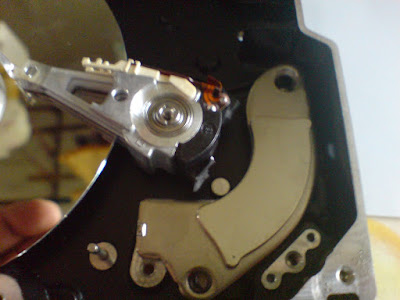
You can finally see the mirror surface of the HDD. Now you will notice something strange (if you haven't) when you move your screwdriver around. Yes, I am not going to spoilt it, I will tell you in the end what is that.

There are about 3 to 4 screw more to unscrew and now you can concentrate on the read write head. Remove any other plastic you can to enable you to move the head. Now, rememeber the bottom screw we can't unscrew. That link the RW head here. So the easy way out is to break the black plastic portion of it.

What do you have now? Take out this strange piece of metal. If you are sharp, you will realized you already had taken out another similar piece and it is radiating some very strange energy... :)

Here is the aftermath of all the destruction :

And here is your prize :

Well, what is it? Its 2 VERY powerful magnet. I think I can say you should not have seen any stronger. Not only that, its a shielded magnet. It only attracts on one side. The reverse is shielded by the metal piece and it does not stick anything at all. I am sure there are more good use for this...

I am sure, not much peopel would like the platter for mirror, so I am not going to cut some fingers removing that.

Wednesday, July 11, 2007

Achieva vs Acecom

Hard disk bought in Singapore is usually covered 3-5 years by 3rd party instead of the manufacturer. I had been a customer to Acecom (http://www.acecom.com.sg/) for years. I believe I had at least exchanged 10 HDD with them (some of which not my own even...).

Now, the new HDD I bought happens to be from another company Archieva (http://www.archieva.com.sg/). Well, its just another company, maybe a bit further from my place... but thats about it. but wait, if you recalled, I had post about this place before when I was conned to collect the "Executive Desktop"...

Now, I finally had to replace one of my harddisk because it has KO. the motor stops for reasons and bad sectors growing all over. Its a 200 GB Seagate HDD. I was there early in the morning, hoping to exchange the HDD since its barely even 2 years. And according to their terms, they can replace with a different model etc... Standard stuff... Guess what?

They CANT replace it. They claim that its EOL (end of line) product. They will send it back to Seagate... Err... WTF? I should had just asked my friend to exchange it for me since he works in Seagate... Whats the point of having a 1-1 exchange warranty when down the road 2-3 years the HDD will definitely be EOL so to speak? Is this not a con job?

Let me tell you what's the difference at Acecom. A few times, they did not have the stock I needed. Guess what? They upgraded the HDD for me... From 80GB to 120GB or 160GB to 200GB. I had never got to wait. I get my replacement on the spot!

Obviously, Achieva does not provide such standard of warranty! They did not even ask me if I prefer a replacement of a different brand or build? Well, so be it. They say it may need to wait for 7 days or so... Thats mean another day lost , another trip down to collect my harddisk. Well, I feel like taking out all my HDD from achieva and ask the mto RMA on my next trip since it will take 1 week. Better RMA them in advance cos I can't get a replacement in time :P

Next time, I will insist on Acecom warranty. Achieva should really close shop I hope.


Monday, May 14, 2007

Metal Gear Box Substance

Just how cheapo can it gets? Look at this :


This Korea company Ennyah is really ripping the branding of MGS off. BTW, if you wonderwhat is this, this is a lousy 3.5" HDD enclosure which is bulky and dangerous. You dun want to get smap by this on the head and certainly wont want to drop this on your feet.

Amazon Gift Cards!

Thanks for viewing!

Copyright © 2008 nemesisv.blogspot.com, All rights reserved.