Grab it at:
http://www.ubuntu.com/
Friday, April 30, 2010


Thursday, April 29, 2010
ATI Catalyst 10.4 Released
After some BETA and testing from various parties, Catalyst 10.4 is finally out for all cards. At the moment where I am writing, there are some errors with the asp scripts on www.amd.com which prevents some users from accessing the drivers. But fear not, I have a working link here:
http://game.amd.com/us-en/drivers_catalyst.aspx
Just choose the version you require to download. Hydravision and other utilities has also been upgrade to 10.4 here.
http://game.amd.com/us-en/drivers_catalyst.aspx
Just choose the version you require to download. Hydravision and other utilities has also been upgrade to 10.4 here.
Tuesday, April 20, 2010
OWASP Top 10 2010 FINAL has been released
The finalized version of OWASP Top 10 2010 is out at:
http://www.owasp.org/index.php/Category:OWASP_Top_Ten_Project
OWASP Top 10 lists the 10 most common web vulnerability and how to address these problems.
http://www.owasp.org/index.php/Category:OWASP_Top_Ten_Project
OWASP Top 10 lists the 10 most common web vulnerability and how to address these problems.
New HTC Maple 3VO ROM V3VO.3.00.041010

A new version of the Maple 3VO ROM is out. The version is now 3VO.3.00.041010!
Grab it via:
http://forum.xda-developers.com/showthread.php?t=551642
Post Javascript, HTML or other codes in Blogspot
There is a automated convertor that haves to encode the codes into postable format for blogspot.
The tool is available via:
http://www.psd2markup.com/display-html-php-javascript-code-in-blogger.html
The tool is available via:
http://www.psd2markup.com/display-html-php-javascript-code-in-blogger.html
Friday, April 09, 2010
Getting the code for the HTC Accuweather Control on Windows Mobile 6.x
After the ROM upgrade, I realized that the localization of the weather is gone and I have to set a new code to receive weather for my region. After some tough luck asking and searching, I found many wrong direction (outdated perhaps). But here is the current solution that works.
Go to:
http://www.accuweather.com/world-index.asp
Enter your country and search for it. After you find some entries, copy the shortcut of the link.
For example, I search Singapore, and it gives the following link:
http://www.accuweather.com/world-index-forecast.asp?partner=accuweather&traveler=0&loccode=ASI|SG|SN---|SINGAPORE
What you are interested is the loccode in RED above. If you just close this windows and think you got it, sorry, you will be wrong. The code somehow does not work. That's because you need to add a "|" at the end of the code. So the correct code should be:
ASI|SG|SN---|SINGAPORE|
In any case, good luck looking for your code. You may want to share some code with other in the comments here.
Go to:
http://www.accuweather.com/world-index.asp
Enter your country and search for it. After you find some entries, copy the shortcut of the link.
For example, I search Singapore, and it gives the following link:
http://www.accuweather.com/world-index-forecast.asp?partner=accuweather&traveler=0&loccode=ASI|SG|SN---|SINGAPORE
What you are interested is the loccode in RED above. If you just close this windows and think you got it, sorry, you will be wrong. The code somehow does not work. That's because you need to add a "|" at the end of the code. So the correct code should be:
ASI|SG|SN---|SINGAPORE|
In any case, good luck looking for your code. You may want to share some code with other in the comments here.
Thursday, April 08, 2010
PS3 V3.2.1 Custom Firmware makes Linux possible again
I guess its no surprise that a custom firmware hack gives hope to installation of Linux on the PS3 again. All we need is a custom firmware to run ISO... Just like on the PSP...
Monday, April 05, 2010
Lose a friend for a LV Bag. Block, ignore and delete off your life. How many will you lose?
I ran this poll sometimes back and here are the final results:

None! Those guys better buy me a LV for my birthday! 4 (36%)
1. I guess it doesn't hurt... 2 (18%)
A few. Who cares? Its a good time to lose some of them. 3 (27%)
ALL OF THEM!!! Who needs friend when you have LV!!! 2 (18%)
Votes so far: 11
Poll closed
Modding the HTC Snap into HTC Maple 3VO ROM
From the last post regarding the installation of the Hard SPL on the HTC Snap:
http://nemesisv.blogspot.com/2010/04/flashing-htc-snap-s52x-maple.html
I guess everyone saw this one coming. The whole point of modification of the SPL is to enable you to flash custom ROM. However, before we even go about talking about the ROM, there is one more piece of software which some people recommend to install. This is the SDA Application Unlock. What this piece of software do it it enable you to install unsigned applications smoothly. However, there is also a security risk that it can allow bad applications like dialers etc install on your phone. So, its entirely optional and you better know what you are doing. The link for this application and the ROM are both listed here:
http://forum.xda-developers.com/showthread.php?t=551642
Follow my previous instruction to install Hard SPL v1.1.9 and/or SDA-ApplcationUnlock. Do a backup as well since its likely you want to restore all your contacts etc. Then:
1.Remove the battery and the SD Card--> Put ONLY the battery back in.
2.The flash will take about 5 minutes (Although it says 15, mine took last then 2 minutes only)
3.If your device is already HardSPL, simply run RomUpdateUtility.exe and follow the prompts
4.Upon first boot, it will seem frozen for a few minutes, maybe even go black. This is NORMAL! (After which you can sync your new ROM wiht your PC)
For me, I use SPB Backup 2 and all I needed to do was to restore all my information in ROM Update mode and its all done. Well in case shit does happen:
1.Remove the battery and the SD Card--> Put ONLY the battery back in.
2.While holding the volume down button, press the power button
3.The multicolor bootloader screen will come up
4.Plug in the USB cable and flash back your original shipped ROM
5.Find out what went wrong and reflash this ROM properly
http://nemesisv.blogspot.com/2010/04/flashing-htc-snap-s52x-maple.html
I guess everyone saw this one coming. The whole point of modification of the SPL is to enable you to flash custom ROM. However, before we even go about talking about the ROM, there is one more piece of software which some people recommend to install. This is the SDA Application Unlock. What this piece of software do it it enable you to install unsigned applications smoothly. However, there is also a security risk that it can allow bad applications like dialers etc install on your phone. So, its entirely optional and you better know what you are doing. The link for this application and the ROM are both listed here:
http://forum.xda-developers.com/showthread.php?t=551642
Follow my previous instruction to install Hard SPL v1.1.9 and/or SDA-ApplcationUnlock. Do a backup as well since its likely you want to restore all your contacts etc. Then:
1.Remove the battery and the SD Card--> Put ONLY the battery back in.
2.The flash will take about 5 minutes (Although it says 15, mine took last then 2 minutes only)
3.If your device is already HardSPL, simply run RomUpdateUtility.exe and follow the prompts
4.Upon first boot, it will seem frozen for a few minutes, maybe even go black. This is NORMAL! (After which you can sync your new ROM wiht your PC)
For me, I use SPB Backup 2 and all I needed to do was to restore all my information in ROM Update mode and its all done. Well in case shit does happen:
1.Remove the battery and the SD Card--> Put ONLY the battery back in.
2.While holding the volume down button, press the power button
3.The multicolor bootloader screen will come up
4.Plug in the USB cable and flash back your original shipped ROM
5.Find out what went wrong and reflash this ROM properly
Here are some screenshot of what Maple 3VO looks like:
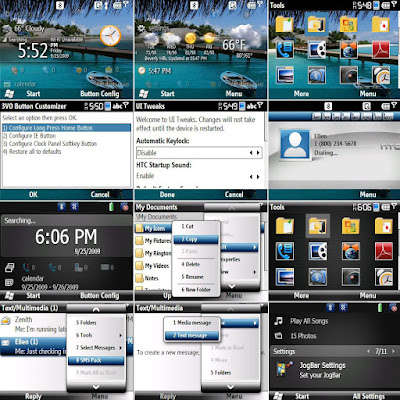
To me, there are some improvements like Opera is out (waste space) and auto locking etc... Try it out and let me know what you think.
Saturday, April 03, 2010
Flashing the HTC Snap S52X Maple
Before the HTC Maple class can be flashed to a custom firmware, the Hard SPL need to be installed. However you can check the SPL version by holding [Volume Down] and doing a cold boot. Mine says 1.24. But I found a way to flash the Hard SPL down to 1.19.
Below are the original instructions:
1. Removed SIM and SD card
2. Connected, established a sync connection w/ActiveSync
3. In JockyW's folder; open "SSPL"
4. Run SSPL.bat
5. If you have a firewall or anti-rootkit running ie. COMODO Internet Security, disable those and the sandbox if your security software has one. I left Bullguard on.
6. Follow commands in command prompt
7. Pop up should show on your device's screen. You may need to dismiss those messages about no SIM cards etc first.
8. The "OK" option is outside of the screen's viewable area, press the trackball or press enter.
9. The phone's screen will shut off but the keyboard will remain lit
10. DO NOT DISCONNECT (Yes, I know there is nothing on the screen)
11. LEAVE ACTIVESYNC ALONE
12. Return to the JockyW folder
13. Run the ROMUpdateUtility
14. It will complete HOWEVER when you start your device, it will stay at the T-Mobile splash screen, but that's okay, given that your device should now be hardSPL'd and you are ready to get a new ROM to install and enjoy, because we know just how much the OEM ROM sucked. For me, the T-Mobile did not turn up.
You need to download the Hard SPL from xda-developer via:
http://forum.xda-developers.com/showthread.php?t=550620
Below are the original instructions:
1. Removed SIM and SD card
2. Connected, established a sync connection w/ActiveSync
3. In JockyW's folder; open "SSPL"
4. Run SSPL.bat
5. If you have a firewall or anti-rootkit running ie. COMODO Internet Security, disable those and the sandbox if your security software has one. I left Bullguard on.
6. Follow commands in command prompt
7. Pop up should show on your device's screen. You may need to dismiss those messages about no SIM cards etc first.
8. The "OK" option is outside of the screen's viewable area, press the trackball or press enter.
9. The phone's screen will shut off but the keyboard will remain lit
10. DO NOT DISCONNECT (Yes, I know there is nothing on the screen)
11. LEAVE ACTIVESYNC ALONE
12. Return to the JockyW folder
13. Run the ROMUpdateUtility
14. It will complete HOWEVER when you start your device, it will stay at the T-Mobile splash screen, but that's okay, given that your device should now be hardSPL'd and you are ready to get a new ROM to install and enjoy, because we know just how much the OEM ROM sucked. For me, the T-Mobile did not turn up.
You need to download the Hard SPL from xda-developer via:
http://forum.xda-developers.com/showthread.php?t=550620
Monday, March 29, 2010
Pictures.library-ms / Music.library-ms / Video.library-ms / Document.library-ms is no longer working
It sound crazy, but there is a very simple solution to this. Basically, open up your explorer and click on "Libraries" on the left side menu. Now you should see the four links on your right. Hightlight them and delete them away.
Oops, all gone. Do not worry, the content is safe. It just remove the link away. Now highlight "Libraries" on the left again and right click. Select "Restore Default Libraries".
Thats all to it. Restore any other links in your libraries if you have them.
Oops, all gone. Do not worry, the content is safe. It just remove the link away. Now highlight "Libraries" on the left again and right click. Select "Restore Default Libraries".
Thats all to it. Restore any other links in your libraries if you have them.
Friday, March 26, 2010
ATI Catalyst 10.1 10.2 Control Center does not work
After some digging and checking, I found out the real cause of one of the machine where the following symptoms exist:
There is no errors in installation on Catalyst 10.x. There is a Catalyst Control Center shortcut when you right click on desktop, but when you click it, nothing happens.
If you have the above, you may have the same problem as me.
Are you using a 64 bits OS? Have you previously installed a lower version Catalyst, such as 9.x or below?
Well, if your answer is yes to the above, it is VERY likely you have the same problem as me.
The problem lies in the bad uninstallation. In drivers before 10.x, there drivers were not properly written and installed as 64 bits software. Therefore, you will see some ATI folders and files in the "Program Files(x86)" directory. Inside there includes the faulty Catalyst Control Center. No matter how you reinstall your 10.x driver, it will go to the 64 bits directory "Program Files" instead and is never properly registered to run.
In case you still have no idea what I am talking about. You can do this to solve the problem:
1. Uninstall Catalyst completely.
2. Boot to saf mode if necessary
3. Remove the ATI directories in Program Files(x86) and in Program Files.
4. Remove ATI registry entries from both HKLM and HKCU.
5. Reboot and reinstall.
I can't believe it is such a screw up that had wasted so much of my time trying to troubleshoot this. I suggest a more through testing from ATI part for different scenarios for this installation which in the first place is already not a very clean solution and is often broken...
There is no errors in installation on Catalyst 10.x. There is a Catalyst Control Center shortcut when you right click on desktop, but when you click it, nothing happens.
If you have the above, you may have the same problem as me.
Are you using a 64 bits OS? Have you previously installed a lower version Catalyst, such as 9.x or below?
Well, if your answer is yes to the above, it is VERY likely you have the same problem as me.
The problem lies in the bad uninstallation. In drivers before 10.x, there drivers were not properly written and installed as 64 bits software. Therefore, you will see some ATI folders and files in the "Program Files(x86)" directory. Inside there includes the faulty Catalyst Control Center. No matter how you reinstall your 10.x driver, it will go to the 64 bits directory "Program Files" instead and is never properly registered to run.
In case you still have no idea what I am talking about. You can do this to solve the problem:
1. Uninstall Catalyst completely.
2. Boot to saf mode if necessary
3. Remove the ATI directories in Program Files(x86) and in Program Files.
4. Remove ATI registry entries from both HKLM and HKCU.
5. Reboot and reinstall.
I can't believe it is such a screw up that had wasted so much of my time trying to troubleshoot this. I suggest a more through testing from ATI part for different scenarios for this installation which in the first place is already not a very clean solution and is often broken...
ATI Catalyst 10.3 is released
At the same time, for those using HD 2xxx, 3xxx and 4xxx card, you may get a "No compatible hardware found" error during the installation of the original driver. In this case, you will need to download the "hotfix" from:
http://support.amd.com/us/kbarticles/Pages/CatalystAGPHotfix.aspx
The other users can download the original driver from:
http://support.amd.com/us/gpudownload/Pages/index.aspx
The changes made for 10.3 includes:
Performance improvements
Aliens vs. Predator
Overall performance increases 5% on ATI Radeon HD 5000 Series products
Battleforge
Improves up to 8% on ATI Radeon HD 5000 Series products
Improves up to 3% on ATI Radeon HD 4800 Series products
Call of Duty: World at War
Improves up to 2% on ATI Radeon HD 5800 Series products
Improves up to 6% on ATI Radeon HD 4800 Series products
Company of Heroes
Improves up to 6% on ATI Radeon HD 5000 Series products
Improves up to 3% on ATI Radeon HD 4800 Series products
Crysis and Crysis Warhead
Improves up to 6% on ATI Radeon HD 5000 Series products
Improves up to 2% on ATI Radeon HD 4800 Series products
Devil May Cry 4
Improves up to 10% on ATI Radeon HD 5000 Series products
Improves up to 6% on ATI Radeon HD 4800 Series products
DiRT 2
Improves up to 30% on ATI Radeon HD 5970 graphics products
Improves up to 20% on ATI Radeon HD 5800 Series and ATI Radeon HD 5700 Series products
Improves up to 10% on ATI Radeon HD 4800 Series products
Enemy Territory: Quake Wars
Improves up to 5% on ATI Radeon HD 5800 Series products
Improves up to 3% on ATI Radeon HD 5000 Series products
Improves up to 2% on ATI Radeon HD 4800 Series products
Far Cry 2
Improves up to 6% on ATI Radeon HD 5000 Series products
Improves up to 4% on ATI Radeon HD 4800 Series products
Left 4 Dead and Left 4 Dead 2
Improves up to 3% on ATI Radeon HD 4800 Series products
S.T.A.L.K.E.R. – Call of Pripyat Benchmark
Improves up to 10% with Anti-Aliasing enabled on ATI Radeon HD 5000 Series products
S.T.A.L.K.E.R. – Clear Sky
Improves up to 2% with ATI Radeon HD 5970 graphics products
Improves up to 2% on ATI Radeon HD 5800 Series products
Resident Evil 5
Improves up to 5% on ATI Radeon HD 5000 Series products
Improves up to 3% on ATI Radeon HD 4800 Series products
Tom Clancy’s H.A.W.X.
Improves up to 15% with ATI Radeon HD 5970 graphics products
Improves up to 20% on ATI Radeon HD 5800 Series products and ATI Radeon HD 5700 Series products
Improves up to 3% on ATI Radeon HD 4800 Series products
Unigine Tropics
Improves up to 5% on ATI Radeon HD 5000 Series products
World in Conflict
Improves up to 5% on ATI Radeon HD 5800 Series products
Improves up to 3% on ATI Radeon HD 5700 Series products
Improves up to 5% on ATI Radeon HD 4800 Series products
Wolfenstein
Improves up to 4% on ATI Radeon HD 5000 Series products
Improves up to 4% on ATI Radeon HD 4800 Series products
New Features
ATI Catalyst™ support for ATI Mobility Radeon™ Premium Graphics solutions
This release of ATI Catalyst™ introduces support for the production version of Windows® 7 and Windows® Vista for notebooks featuring the ATI Mobility Radeon™ HD 2000 Series, ATI Mobility™ Radeon HD 3000 Series, and ATI Mobility Radeon™ HD 4000 Series, and ATI Mobility Radeon™ HD 5000 Series of products.
Supported by most major OEM and ODM notebook manufacturers
ATI Catalyst Control Center - ATI Eyefinity technology enhancements
Display Bezel Compensation
Easy-to-use wizard shows users how to adjust their display layout to remove the pixels occupied by their display bezels
AMD has updated it’s Direct3D (Quad buffer support) driver to enable 3rd party middleware vendors such as DDD and iZ3D to output stereo L/R images at 120 Hz (60 Hz per eye)
Per-Display Color Adjust
Individual Color, Brightness and Contrast controls
Multiple ATI Eyefinity Groups
Create more than one ATI Eyefinity group from multiple displays
Improved Display Configuration switching
Support for ATI Eyefinity groups and the ATI Catalyst™ Control Center profile manager
Easy to toggle between cloned and extended desktop modes
ATI Catalyst™ support for 3D Stereoscopic
http://support.amd.com/us/kbarticles/Pages/CatalystAGPHotfix.aspx
The other users can download the original driver from:
http://support.amd.com/us/gpudownload/Pages/index.aspx
The changes made for 10.3 includes:
Performance improvements
Aliens vs. Predator
Overall performance increases 5% on ATI Radeon HD 5000 Series products
Battleforge
Improves up to 8% on ATI Radeon HD 5000 Series products
Improves up to 3% on ATI Radeon HD 4800 Series products
Call of Duty: World at War
Improves up to 2% on ATI Radeon HD 5800 Series products
Improves up to 6% on ATI Radeon HD 4800 Series products
Company of Heroes
Improves up to 6% on ATI Radeon HD 5000 Series products
Improves up to 3% on ATI Radeon HD 4800 Series products
Crysis and Crysis Warhead
Improves up to 6% on ATI Radeon HD 5000 Series products
Improves up to 2% on ATI Radeon HD 4800 Series products
Devil May Cry 4
Improves up to 10% on ATI Radeon HD 5000 Series products
Improves up to 6% on ATI Radeon HD 4800 Series products
DiRT 2
Improves up to 30% on ATI Radeon HD 5970 graphics products
Improves up to 20% on ATI Radeon HD 5800 Series and ATI Radeon HD 5700 Series products
Improves up to 10% on ATI Radeon HD 4800 Series products
Enemy Territory: Quake Wars
Improves up to 5% on ATI Radeon HD 5800 Series products
Improves up to 3% on ATI Radeon HD 5000 Series products
Improves up to 2% on ATI Radeon HD 4800 Series products
Far Cry 2
Improves up to 6% on ATI Radeon HD 5000 Series products
Improves up to 4% on ATI Radeon HD 4800 Series products
Left 4 Dead and Left 4 Dead 2
Improves up to 3% on ATI Radeon HD 4800 Series products
S.T.A.L.K.E.R. – Call of Pripyat Benchmark
Improves up to 10% with Anti-Aliasing enabled on ATI Radeon HD 5000 Series products
S.T.A.L.K.E.R. – Clear Sky
Improves up to 2% with ATI Radeon HD 5970 graphics products
Improves up to 2% on ATI Radeon HD 5800 Series products
Resident Evil 5
Improves up to 5% on ATI Radeon HD 5000 Series products
Improves up to 3% on ATI Radeon HD 4800 Series products
Tom Clancy’s H.A.W.X.
Improves up to 15% with ATI Radeon HD 5970 graphics products
Improves up to 20% on ATI Radeon HD 5800 Series products and ATI Radeon HD 5700 Series products
Improves up to 3% on ATI Radeon HD 4800 Series products
Unigine Tropics
Improves up to 5% on ATI Radeon HD 5000 Series products
World in Conflict
Improves up to 5% on ATI Radeon HD 5800 Series products
Improves up to 3% on ATI Radeon HD 5700 Series products
Improves up to 5% on ATI Radeon HD 4800 Series products
Wolfenstein
Improves up to 4% on ATI Radeon HD 5000 Series products
Improves up to 4% on ATI Radeon HD 4800 Series products
New Features
ATI Catalyst™ support for ATI Mobility Radeon™ Premium Graphics solutions
This release of ATI Catalyst™ introduces support for the production version of Windows® 7 and Windows® Vista for notebooks featuring the ATI Mobility Radeon™ HD 2000 Series, ATI Mobility™ Radeon HD 3000 Series, and ATI Mobility Radeon™ HD 4000 Series, and ATI Mobility Radeon™ HD 5000 Series of products.
Supported by most major OEM and ODM notebook manufacturers
ATI Catalyst Control Center - ATI Eyefinity technology enhancements
Display Bezel Compensation
Easy-to-use wizard shows users how to adjust their display layout to remove the pixels occupied by their display bezels
AMD has updated it’s Direct3D (Quad buffer support) driver to enable 3rd party middleware vendors such as DDD and iZ3D to output stereo L/R images at 120 Hz (60 Hz per eye)
Per-Display Color Adjust
Individual Color, Brightness and Contrast controls
Multiple ATI Eyefinity Groups
Create more than one ATI Eyefinity group from multiple displays
Improved Display Configuration switching
Support for ATI Eyefinity groups and the ATI Catalyst™ Control Center profile manager
Easy to toggle between cloned and extended desktop modes
ATI Catalyst™ support for 3D Stereoscopic
Wednesday, March 24, 2010
Western Digital Advance Format Drives
Recently I had the wall with a new technology from Western Digital known as "Advance Format". Well, hit the wall as in I do not think my HDD is performing as it is suppose to be and in fact doing pretty badly at it. The HDD keep chunking and I had been checking for signs for malware or background process. I did not have this issue when I was on my previous Seagate 7200.11. In any case, you will notice what I have here is basically just a string of bad luck.
Firstly, what is Advance Format. It may sound deep, but basically all it means is that it is using 4K cluster instead of the legacy 512bytes which has been like 10 years or so... Thats all to it. Well, if you want the details, AnandTech did a good write up to explain how this will open the door for further larger capacity drives as well as how this can save some space because of using 1 ECC for a 4K block instead of like 8 ECC for 8 x 512Bytes block.
AnandTech on WD Advance Format:
http://anandtech.com/storage/showdoc.aspx?i=3691
OK, strangely, this is already supported in Windows Vista, 7, 2008 but not the older legacy OS based on the Windows 5.x core like Windows 2003, XP etc. Please do not even ask me about Windows 2000... So that means somehow you get very bad performance (due to misaligned sector all the time) or it simply doesn't work at all. WD had came up with a utility (together with Acronis) which in my opinion is nothing more than a tool that checks for 512bytes clusters and basically convert the whole partition to 4K cluster. There is also a version that works in Windows (with Paragon), but it can be 3X slower as indicated by WD. In addition, you can test out your scenario to see if you need to run this at all using the wizard on the right here:
http://www.wdc.com/en/products/advancedformat/
So far from what I see so far, the only affected range of HDD which has the Advance Format functionality is those ending with EARS. I have another drive with EADS, but according to sources it should not be affected. Maybe I should send WD an email to confirm this. Another pressing problem is that Windows 2003 is not affected or supported.
Update : OK here is what I think and understand so far. I had send queries to WD, hope they will give a solid answer.
Firstly, what is Advance Format. It may sound deep, but basically all it means is that it is using 4K cluster instead of the legacy 512bytes which has been like 10 years or so... Thats all to it. Well, if you want the details, AnandTech did a good write up to explain how this will open the door for further larger capacity drives as well as how this can save some space because of using 1 ECC for a 4K block instead of like 8 ECC for 8 x 512Bytes block.
AnandTech on WD Advance Format:
http://anandtech.com/storage/showdoc.aspx?i=3691
OK, strangely, this is already supported in Windows Vista, 7, 2008 but not the older legacy OS based on the Windows 5.x core like Windows 2003, XP etc. Please do not even ask me about Windows 2000... So that means somehow you get very bad performance (due to misaligned sector all the time) or it simply doesn't work at all. WD had came up with a utility (together with Acronis) which in my opinion is nothing more than a tool that checks for 512bytes clusters and basically convert the whole partition to 4K cluster. There is also a version that works in Windows (with Paragon), but it can be 3X slower as indicated by WD. In addition, you can test out your scenario to see if you need to run this at all using the wizard on the right here:
http://www.wdc.com/en/products/advancedformat/
So far from what I see so far, the only affected range of HDD which has the Advance Format functionality is those ending with EARS. I have another drive with EADS, but according to sources it should not be affected. Maybe I should send WD an email to confirm this. Another pressing problem is that Windows 2003 is not affected or supported.
Update : OK here is what I think and understand so far. I had send queries to WD, hope they will give a solid answer.
- Jumper 7-8 : Only if you are using the HDD as 1 partition. >1 partition, you can forget about this.
- Windows 2003 : Supported using the Acronis Boot CD. But to what effects, I am not sure. I suppose it will behave like Windows XP
- EADS drives : Not supported by AF. In short, does not apply to you.
- WHS : See Windows 2003 above. Also note that because of the dynamic disk, high chance of screwing this up...
Tuesday, March 23, 2010
Bullguard FakeAlert.5 Remedy if your PC is still running
If you have not rebooted and the PC is still running with the bad signature, there is good hope you can save it (with my experience).
1. Do not click on the prompts which indicates files to be quarantine. Just fire up the Bullguard GUI and disable the antivirus component. (YES, this is a REAL bad thing to do...). The prompt will all disappears but the remaining files will NOT be quarantine.
2. Open up your quarantine folder and restore all the files (PLEASE, I DO NOT MEAN
3. Now think of any other things you would want to do including backup of important files etc before you go ahead and reboot the machine. Notice I did not use the "patch" issued by Bullguard? You may want to uninstall Bullguard now, but I leave it for now, hoping I can do a update after the reboot so that things goes back into places.
4. Sad thing is after the reboot, most is saved, except Bullguard itself. I am no longer able to update. So its time to finally uninstall it. Do check that there is no more entries in the quarantine that is affected by FakeAlert.5. Do take note to save your settings during uninstall. The only thing that went bad was the antivirus signature, so you can still save your rules etc (IF you still want to use Bullguard...). Reboot again as required by Bullguard. But perhaps before that, grab the latest version of Bullguard (9.0) from their website first so that you can reinstall immediately after reboot.
5. Yes, everything should still work. Reinstall Bullguard, reboot (yes, again), and update the signature again. Everything should work this time.
Now, for me it wasn't so bad. I guess its all about keeping your cool and planning this just like any other disaster recover process.
I just hope everyone was so lucky...
1. Do not click on the prompts which indicates files to be quarantine. Just fire up the Bullguard GUI and disable the antivirus component. (YES, this is a REAL bad thing to do...). The prompt will all disappears but the remaining files will NOT be quarantine.
2. Open up your quarantine folder and restore all the files (PLEASE, I DO NOT MEAN
3. Now think of any other things you would want to do including backup of important files etc before you go ahead and reboot the machine. Notice I did not use the "patch" issued by Bullguard? You may want to uninstall Bullguard now, but I leave it for now, hoping I can do a update after the reboot so that things goes back into places.
4. Sad thing is after the reboot, most is saved, except Bullguard itself. I am no longer able to update. So its time to finally uninstall it. Do check that there is no more entries in the quarantine that is affected by FakeAlert.5. Do take note to save your settings during uninstall. The only thing that went bad was the antivirus signature, so you can still save your rules etc (IF you still want to use Bullguard...). Reboot again as required by Bullguard. But perhaps before that, grab the latest version of Bullguard (9.0) from their website first so that you can reinstall immediately after reboot.
5. Yes, everything should still work. Reinstall Bullguard, reboot (yes, again), and update the signature again. Everything should work this time.
Now, for me it wasn't so bad. I guess its all about keeping your cool and planning this just like any other disaster recover process.
I just hope everyone was so lucky...
Bitdefender FakeAlert.5 Aftermath
With PC totally destroyed and a mob of raging red angry customer, should Bitdefender pay for this critical mistake? After all, the damage done is probably far worse than any virus we seen (Other than information leakage which leads to other things).
See some angry users from Bullguard:
http://forum.bullguard.com/forum/15/TrojanFakeAlert5-Update-issue_84115.html
and even a Facebook group to discuss about a possible law suite:
http://www.facebook.com/#!/group.php?gid=111067232241441&ref=search&sid=659748374.4122958007..1
and lets not forget the origin of the issue at Bitdefender:
http://forum.bitdefender.com/index.php?showtopic=18786
Lets sit back and see how this unroll. Perhaps we are looking at a first customer-sue-antivirus-company-and-win case.
See some angry users from Bullguard:
http://forum.bullguard.com/forum/15/TrojanFakeAlert5-Update-issue_84115.html
and even a Facebook group to discuss about a possible law suite:
http://www.facebook.com/#!/group.php?gid=111067232241441&ref=search&sid=659748374.4122958007..1
and lets not forget the origin of the issue at Bitdefender:
http://forum.bitdefender.com/index.php?showtopic=18786
Lets sit back and see how this unroll. Perhaps we are looking at a first customer-sue-antivirus-company-and-win case.
Microsoft XP Mode no longer needs virtualized hardware
For a while, people using the cheaper end quad core Intel Q series processor find themselves unable to install Windows 7's XP Mode due to a hardware requirement for the VT technology.
While VT speeds up the virtualization using hardware, by no means it is impossible to purely run on software especially if you have quad core or more.
Fortunately, Microsoft had finally realized this and had enabled the option to run XP Mode WITHOUT the VT Technology. This is shown in the 3rd button when you attempt to download Microsoft Virtual PC via:
http://www.microsoft.com/windows/virtual-pc/download.aspx
This is indeed a great news to many including myself who has more than a few Intel Q8200 around.
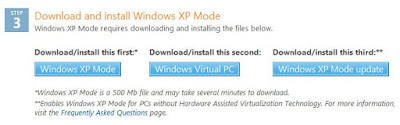
While VT speeds up the virtualization using hardware, by no means it is impossible to purely run on software especially if you have quad core or more.
Fortunately, Microsoft had finally realized this and had enabled the option to run XP Mode WITHOUT the VT Technology. This is shown in the 3rd button when you attempt to download Microsoft Virtual PC via:
http://www.microsoft.com/windows/virtual-pc/download.aspx
This is indeed a great news to many including myself who has more than a few Intel Q8200 around.

Firefox and Opera new release to fix issues
Firefox 3.6.2 had been silently released. Some users may actually see a prompt stating that a critical update is available, but unable to download. This is referring to the Firefox 3.6.2 update which address some very critical vulnerabilities. I had not be able to find the exact update file online, but what you can do is to simply go to the download page for Firefox and download 3.6 again. After installation, you will notice that it is now 3.6.2.
On the other hand, Opera has also release 10.51 which address 2 of the high risk vulnerabilities. This should automatically be updated.
On the other hand, Opera has also release 10.51 which address 2 of the high risk vulnerabilities. This should automatically be updated.
Monday, March 22, 2010
Subscribe to:
Posts (Atom)