After the long wait, Metasploit 3.4.0 is finally released as final. However, if you had been on the trunk branch, you will be able to get 3.4.1-dev by now via svn.
Changes in Metasploit 3.3 to 3.4:
http://www.metasploit.com/redmine/projects/framework/wiki/Release_Notes_34
Thursday, May 20, 2010


Tuesday, May 18, 2010
IE 6 Must Die!
Yes, IE6 is way expired, sour and smells funny by now, but suckers (aka banks) still love it. Why? Because they have developer who can only develop applications that only works in IE6. When challenged , they will bring out the dusty old paper stating the bank supports IE6 which was written years ago. Whose fault? Everyone! And that include you, if you are still using IE6 to access your banking application. In short, IE6 Must Die!
Read more from the IE6 developers:
When will you patch?
This was a poll I ran sometimes back to see how fast / slow will the reader patches and here is the results:


Wednesday, May 05, 2010
Analyzing Malwares Using Microsoft Tools
This article is very technical, but nevertheless shows that even with simple (ok, but not so simple) and free tools from Microsoft, we can begin to do some malware analysis on our own.
http://community.websense.com/blogs/securitylabs/archive/2010/04/29/analyzing-malwares-using-microsoft-tools.aspx
Beware, the Windbg package includes the WDK (which had just been updated and is of Apr 2010 instead of March 2009 as mentioned in the article) is quite big (700MB).
http://community.websense.com/blogs/securitylabs/archive/2010/04/29/analyzing-malwares-using-microsoft-tools.aspx
Beware, the Windbg package includes the WDK (which had just been updated and is of Apr 2010 instead of March 2009 as mentioned in the article) is quite big (700MB).
Monday, May 03, 2010
Keyboard Problem in Vmware running Ubuntu 10.04 LTS
It seems that the default keyboard was setup wrongly for use in VMware for the Ubuntu 10.04 release. What actually happens is that at the boot up, the keyboard completely did not work. If this is your problem you are at the right post.
Here is the step by step on how to fix it:
1. At the login screen, click on the little man in circle icon below to enable universal access preferences. Check the first option for a virtual keyboard.
2. For some users, there is just a flash and then nothing happens. If this is the case, simply click on the reboot icon at the bottom to reboot.
3. Once the Virtual Keyboard is up, use it to login.
4. Once inside Ubuntu, the keyboard will work. Open a shell and get to /etc/default. Edit this file with whatever you prefer (pico, nano, vi etc)
5. Find the following right at the end:
XKBMODEL="SKIP"
XKBLAYOUT="us"
XKBVARIANT="U.S. English"
XKBOPTIONS=""
This is where the problem lies. You need to edit it to:
XKBMODEL="pc105"
XKBLAYOUT="us"
XKBVARIANT=""
XKBOPTIONS=""
The "pc105" is the most important line. After which, reboot if you feel like it and the keyboard will work.
6. If you hate the Virtual Keyboard, simple disable it at the login screen.
Here is the step by step on how to fix it:
1. At the login screen, click on the little man in circle icon below to enable universal access preferences. Check the first option for a virtual keyboard.
2. For some users, there is just a flash and then nothing happens. If this is the case, simply click on the reboot icon at the bottom to reboot.
3. Once the Virtual Keyboard is up, use it to login.
4. Once inside Ubuntu, the keyboard will work. Open a shell and get to /etc/default. Edit this file with whatever you prefer (pico, nano, vi etc)
5. Find the following right at the end:
XKBMODEL="SKIP"
XKBLAYOUT="us"
XKBVARIANT="U.S. English"
XKBOPTIONS=""
This is where the problem lies. You need to edit it to:
XKBMODEL="pc105"
XKBLAYOUT="us"
XKBVARIANT=""
XKBOPTIONS=""
The "pc105" is the most important line. After which, reboot if you feel like it and the keyboard will work.
6. If you hate the Virtual Keyboard, simple disable it at the login screen.
Friday, April 30, 2010
Thursday, April 29, 2010
ATI Catalyst 10.4 Released
After some BETA and testing from various parties, Catalyst 10.4 is finally out for all cards. At the moment where I am writing, there are some errors with the asp scripts on www.amd.com which prevents some users from accessing the drivers. But fear not, I have a working link here:
http://game.amd.com/us-en/drivers_catalyst.aspx
Just choose the version you require to download. Hydravision and other utilities has also been upgrade to 10.4 here.
http://game.amd.com/us-en/drivers_catalyst.aspx
Just choose the version you require to download. Hydravision and other utilities has also been upgrade to 10.4 here.
Tuesday, April 20, 2010
OWASP Top 10 2010 FINAL has been released
The finalized version of OWASP Top 10 2010 is out at:
http://www.owasp.org/index.php/Category:OWASP_Top_Ten_Project
OWASP Top 10 lists the 10 most common web vulnerability and how to address these problems.
http://www.owasp.org/index.php/Category:OWASP_Top_Ten_Project
OWASP Top 10 lists the 10 most common web vulnerability and how to address these problems.
New HTC Maple 3VO ROM V3VO.3.00.041010

A new version of the Maple 3VO ROM is out. The version is now 3VO.3.00.041010!
Grab it via:
http://forum.xda-developers.com/showthread.php?t=551642
Post Javascript, HTML or other codes in Blogspot
There is a automated convertor that haves to encode the codes into postable format for blogspot.
The tool is available via:
http://www.psd2markup.com/display-html-php-javascript-code-in-blogger.html
The tool is available via:
http://www.psd2markup.com/display-html-php-javascript-code-in-blogger.html
Friday, April 09, 2010
Getting the code for the HTC Accuweather Control on Windows Mobile 6.x
After the ROM upgrade, I realized that the localization of the weather is gone and I have to set a new code to receive weather for my region. After some tough luck asking and searching, I found many wrong direction (outdated perhaps). But here is the current solution that works.
Go to:
http://www.accuweather.com/world-index.asp
Enter your country and search for it. After you find some entries, copy the shortcut of the link.
For example, I search Singapore, and it gives the following link:
http://www.accuweather.com/world-index-forecast.asp?partner=accuweather&traveler=0&loccode=ASI|SG|SN---|SINGAPORE
What you are interested is the loccode in RED above. If you just close this windows and think you got it, sorry, you will be wrong. The code somehow does not work. That's because you need to add a "|" at the end of the code. So the correct code should be:
ASI|SG|SN---|SINGAPORE|
In any case, good luck looking for your code. You may want to share some code with other in the comments here.
Go to:
http://www.accuweather.com/world-index.asp
Enter your country and search for it. After you find some entries, copy the shortcut of the link.
For example, I search Singapore, and it gives the following link:
http://www.accuweather.com/world-index-forecast.asp?partner=accuweather&traveler=0&loccode=ASI|SG|SN---|SINGAPORE
What you are interested is the loccode in RED above. If you just close this windows and think you got it, sorry, you will be wrong. The code somehow does not work. That's because you need to add a "|" at the end of the code. So the correct code should be:
ASI|SG|SN---|SINGAPORE|
In any case, good luck looking for your code. You may want to share some code with other in the comments here.
Thursday, April 08, 2010
PS3 V3.2.1 Custom Firmware makes Linux possible again
I guess its no surprise that a custom firmware hack gives hope to installation of Linux on the PS3 again. All we need is a custom firmware to run ISO... Just like on the PSP...
Monday, April 05, 2010
Lose a friend for a LV Bag. Block, ignore and delete off your life. How many will you lose?
I ran this poll sometimes back and here are the final results:

None! Those guys better buy me a LV for my birthday! 4 (36%)
1. I guess it doesn't hurt... 2 (18%)
A few. Who cares? Its a good time to lose some of them. 3 (27%)
ALL OF THEM!!! Who needs friend when you have LV!!! 2 (18%)
Votes so far: 11
Poll closed
Modding the HTC Snap into HTC Maple 3VO ROM
From the last post regarding the installation of the Hard SPL on the HTC Snap:
http://nemesisv.blogspot.com/2010/04/flashing-htc-snap-s52x-maple.html
I guess everyone saw this one coming. The whole point of modification of the SPL is to enable you to flash custom ROM. However, before we even go about talking about the ROM, there is one more piece of software which some people recommend to install. This is the SDA Application Unlock. What this piece of software do it it enable you to install unsigned applications smoothly. However, there is also a security risk that it can allow bad applications like dialers etc install on your phone. So, its entirely optional and you better know what you are doing. The link for this application and the ROM are both listed here:
http://forum.xda-developers.com/showthread.php?t=551642
Follow my previous instruction to install Hard SPL v1.1.9 and/or SDA-ApplcationUnlock. Do a backup as well since its likely you want to restore all your contacts etc. Then:
1.Remove the battery and the SD Card--> Put ONLY the battery back in.
2.The flash will take about 5 minutes (Although it says 15, mine took last then 2 minutes only)
3.If your device is already HardSPL, simply run RomUpdateUtility.exe and follow the prompts
4.Upon first boot, it will seem frozen for a few minutes, maybe even go black. This is NORMAL! (After which you can sync your new ROM wiht your PC)
For me, I use SPB Backup 2 and all I needed to do was to restore all my information in ROM Update mode and its all done. Well in case shit does happen:
1.Remove the battery and the SD Card--> Put ONLY the battery back in.
2.While holding the volume down button, press the power button
3.The multicolor bootloader screen will come up
4.Plug in the USB cable and flash back your original shipped ROM
5.Find out what went wrong and reflash this ROM properly
http://nemesisv.blogspot.com/2010/04/flashing-htc-snap-s52x-maple.html
I guess everyone saw this one coming. The whole point of modification of the SPL is to enable you to flash custom ROM. However, before we even go about talking about the ROM, there is one more piece of software which some people recommend to install. This is the SDA Application Unlock. What this piece of software do it it enable you to install unsigned applications smoothly. However, there is also a security risk that it can allow bad applications like dialers etc install on your phone. So, its entirely optional and you better know what you are doing. The link for this application and the ROM are both listed here:
http://forum.xda-developers.com/showthread.php?t=551642
Follow my previous instruction to install Hard SPL v1.1.9 and/or SDA-ApplcationUnlock. Do a backup as well since its likely you want to restore all your contacts etc. Then:
1.Remove the battery and the SD Card--> Put ONLY the battery back in.
2.The flash will take about 5 minutes (Although it says 15, mine took last then 2 minutes only)
3.If your device is already HardSPL, simply run RomUpdateUtility.exe and follow the prompts
4.Upon first boot, it will seem frozen for a few minutes, maybe even go black. This is NORMAL! (After which you can sync your new ROM wiht your PC)
For me, I use SPB Backup 2 and all I needed to do was to restore all my information in ROM Update mode and its all done. Well in case shit does happen:
1.Remove the battery and the SD Card--> Put ONLY the battery back in.
2.While holding the volume down button, press the power button
3.The multicolor bootloader screen will come up
4.Plug in the USB cable and flash back your original shipped ROM
5.Find out what went wrong and reflash this ROM properly
Here are some screenshot of what Maple 3VO looks like:
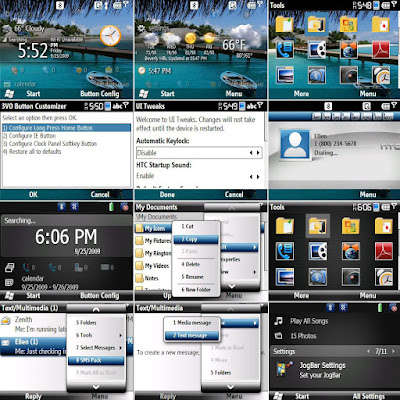
To me, there are some improvements like Opera is out (waste space) and auto locking etc... Try it out and let me know what you think.
Saturday, April 03, 2010
Flashing the HTC Snap S52X Maple
Before the HTC Maple class can be flashed to a custom firmware, the Hard SPL need to be installed. However you can check the SPL version by holding [Volume Down] and doing a cold boot. Mine says 1.24. But I found a way to flash the Hard SPL down to 1.19.
Below are the original instructions:
1. Removed SIM and SD card
2. Connected, established a sync connection w/ActiveSync
3. In JockyW's folder; open "SSPL"
4. Run SSPL.bat
5. If you have a firewall or anti-rootkit running ie. COMODO Internet Security, disable those and the sandbox if your security software has one. I left Bullguard on.
6. Follow commands in command prompt
7. Pop up should show on your device's screen. You may need to dismiss those messages about no SIM cards etc first.
8. The "OK" option is outside of the screen's viewable area, press the trackball or press enter.
9. The phone's screen will shut off but the keyboard will remain lit
10. DO NOT DISCONNECT (Yes, I know there is nothing on the screen)
11. LEAVE ACTIVESYNC ALONE
12. Return to the JockyW folder
13. Run the ROMUpdateUtility
14. It will complete HOWEVER when you start your device, it will stay at the T-Mobile splash screen, but that's okay, given that your device should now be hardSPL'd and you are ready to get a new ROM to install and enjoy, because we know just how much the OEM ROM sucked. For me, the T-Mobile did not turn up.
You need to download the Hard SPL from xda-developer via:
http://forum.xda-developers.com/showthread.php?t=550620
Below are the original instructions:
1. Removed SIM and SD card
2. Connected, established a sync connection w/ActiveSync
3. In JockyW's folder; open "SSPL"
4. Run SSPL.bat
5. If you have a firewall or anti-rootkit running ie. COMODO Internet Security, disable those and the sandbox if your security software has one. I left Bullguard on.
6. Follow commands in command prompt
7. Pop up should show on your device's screen. You may need to dismiss those messages about no SIM cards etc first.
8. The "OK" option is outside of the screen's viewable area, press the trackball or press enter.
9. The phone's screen will shut off but the keyboard will remain lit
10. DO NOT DISCONNECT (Yes, I know there is nothing on the screen)
11. LEAVE ACTIVESYNC ALONE
12. Return to the JockyW folder
13. Run the ROMUpdateUtility
14. It will complete HOWEVER when you start your device, it will stay at the T-Mobile splash screen, but that's okay, given that your device should now be hardSPL'd and you are ready to get a new ROM to install and enjoy, because we know just how much the OEM ROM sucked. For me, the T-Mobile did not turn up.
You need to download the Hard SPL from xda-developer via:
http://forum.xda-developers.com/showthread.php?t=550620
Subscribe to:
Posts (Atom)